/*function openScreenshot(url) { window.open(url, 'screenshots','toolbar=0,location=0,directories=0,status=0,menubar=0,scrollbars=0,resizable=0, copyhistory=0,width=780,height=560'); }*/
dog
 
CDpedia
Rocking all over the world
buy download
screenshot
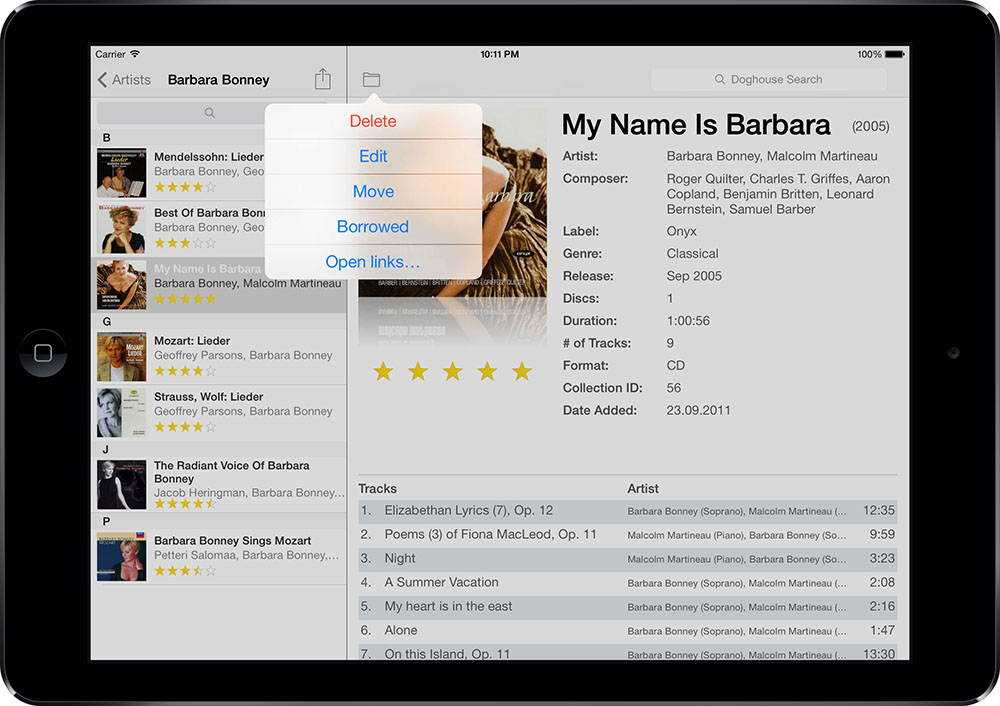
Even though this is the age of digital music, it doesn't mean CDs have gone the way of the betamax. But how are you to organize and keep track of your CD collection? Let CDpedia give you a hand: it retrieves information about your CDs automatically from the Internet, lets you organize the entries into collections and integrates with iTunes to let you know which CDs or single songs you have imported already.
world
Let's get it started
Getting your CD collection into CDpedia is easy because the program does most of the work for you. Insert a CD into your computer and CDpedia will automatically start a search on freedb.org, a free, online music database. Then you can add to that information by searching any of the other 8 search sites found in CDpedia. Or if you prefer, you can also do a keyword search for the information or use an iSight or a scanner to scan the bar code into the search field and let CDpedia take care of the rest.
Happy together
CDpedia helps you organize your physical CD collection but that doesn't mean iTunes should be left out of the loop. It's all about sharing... If you already have a CD or songs from that CD in iTunes, CDpedia will mark the album or the songs with a little blue note. That way you can see at a glance what songs or albums you have already imported into iTunes. And no need to switch applications when you want to listen to a song either - hit the play button in CDpedia and the song will start playing in iTunes automatically. collections screenshot
Help!
Now that you have all your CDs in CDpedia, how are you supposed to get them organized? The magic words are 'smart collections'. You can set as many or as little criteria as you like for each smart collection and CDpedia will sort your CDs accordingly. Then every time you add a new CD to the program, the smart collections will automatically update themselves so you don't have to. Do your friends like borrowing your CDs? Then CDpedia can help you there too. It can keep track of who borrowed which CD at what date and when they are supposed to return it.
Try me
These are just a few of the many wonderful features CDpedia has to offer. To really see what CDpedia can do for you and your CD collection, download the free demo version now and have a look for yourself. The demo version limits you to adding 10 CDs but is otherwise fully functional. To remove the restriction, buy CDpedia here or from within the application.

If you're also interested in our other Pedias, check out the bundle prices link at the top of the page.
Screenshots
screenshot 1 screenshot 2 screenshot 3
Are you interested in more than one Pedia application? Then have a look at our bundle price offers.
universal binary
Version: 4.2.2     Size: 7.2 MB
Requirements: OS X 10.4.9+
 
Feature Highlights
full screen mode Full screen mode (view and play)
apple remote Apple Remote compatible
search sites 9 different search sites
bar code iSight & scanner integration
Bluetooth icon Bluetooth support
itunes icon iTunes integration + CDDB
smart collection Self-updating smart collections
info view button Customizable info display
borrowed icon Borrowed feature with due date
links Add links to URLs, files or images
address book Address book integration
ipod iPod export
iphone iPhone export (via browser)
wishlist icon Wishlist collection
HTML icon Customizable HTML export
dotmac Direct export to .Mac
spotlight icon Spotlight integration
leopard Quick Look integration
independent collection Library-independent collections
collection folders Folders for better organization
widget AmazonPedia widget included
statistics Database statistics
localizations Spanish, French, German, Italian & Dutch localizations
Raves and reviews
 
 
  delicious  furl  iusethis 
  magnolia  blinklist yahoo