/*function openScreenshot(url) { window.open(url, 'screenshots','toolbar=0,location=0,directories=0,status=0,menubar=0,scrollbars=0,resizable=0, copyhistory=0,width=780,height=560'); }*/
dog
 
Bookpedia
What's on your shelves?
buy download
screenshot
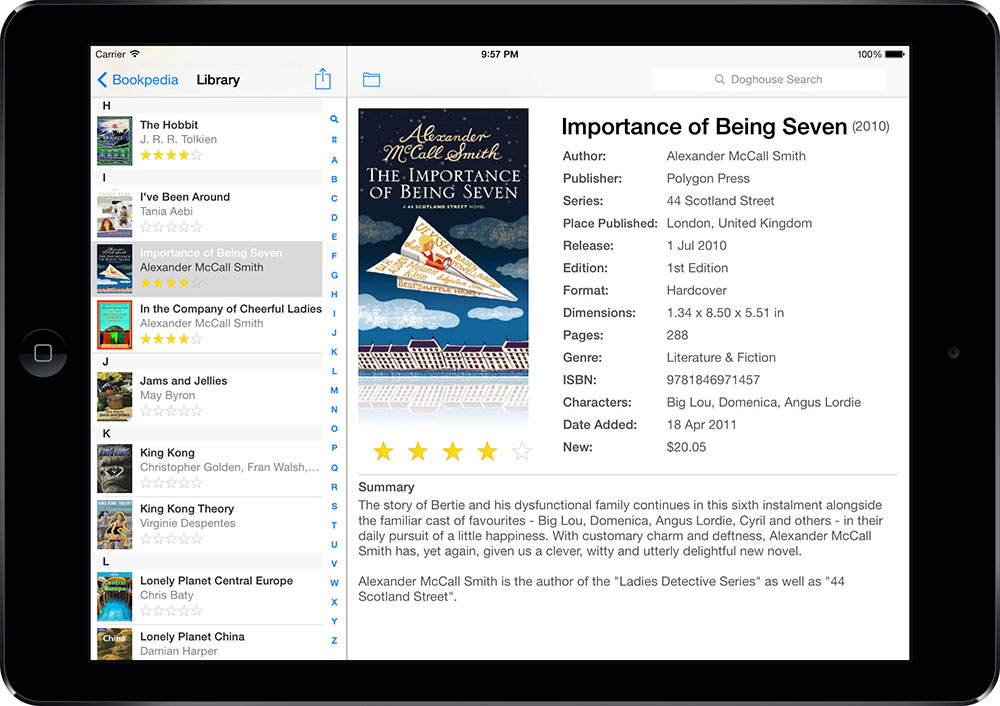
Whether books line every wall of your house or barely fill one shelf, Bookpedia is the perfect application to help you keep track of them. Entering the information for each book is fast and easy because the program retrieves all the information from the Internet for you. So you
can sit back and relax with a good book.
world
Oh, the places you'll go...
To retrieve information about your books, Bookpedia gives you access to all the Amazon sites as well as the Library of Congress and several international book sites. In addition, Bookpedia also lets you access most libraries attached to the z39.50 server system. You can search for your books using keywords - for example title, author, publisher, ISBN or a combination of them all - or if you have a scanner or an iSight, just scan the UPC and let Bookpedia do the rest.
Keep it clean
If your books are all in a jumble, Bookpedia will help you organize them, at least on your computer. Create as many collections as you like to sort your books or if you want Bookpedia to do the grunt work for you, set up smart collections. Specify the criteria for the smart collections and they will update themselves automatically each time a new book is added to the program. There is even a dedicated collection for books you don't own yet - the wishlist collection lets you add books without actually adding them to the library so you can keep them apart but still remember them for the future. borrowed book screenshot
Know thy shelf
Whether you have 15 books or 1500, chances are your friends will want to borrow them once in a while. Thanks to Bookpedia you won't have to worry about seeing the book again or forgetting who took it in the first place. The borrowed collection helps you keep track of who took which book at what date and when they were supposed to return it. And if it's not back in your library by that date, Bookpedia can automatically send an email to the borrower.
Learning by doing
These are just a few of the many wonderful features Bookpedia has to offer. To really see what Bookpedia can do for you and your library, download the free demo version now and have a look for yourself. The demo version limits you to adding 10 books but is otherwise fully functional. To remove the restriction, buy Bookpedia here or from within the application.

If you're also interested in our other Pedias, check out the bundle prices link at the top of the page.
Screenshots
screenshot 1 screenshot 2 screenshot 3
Are you interested in more than one Pedia application? Then have a look at our bundle price offers.
universal binary
Version: 4.2.2     Size: 7.7 MB
Requirements: OS X 10.4.9+
 
Feature Highlights
full screen mode Full screen mode (view and play)
apple remote Apple Remote compatible
search sites Over 10 international search sites and access to z39.50 library servers
bar code iSight & scanner integration
Bluetooth icon Bluetooth connection enabled
MLA icon MLA style bibliography draw-up
links Add links to URLs, files or images
borrowed icon Borrowed feature with due date
address book Address book integration
wishlist icon Wishlist collection
HTML icon Customizable HTML export with BibTex & EndNote templates included
dotmac Direct export to .Mac
ipod iPod export
iphone iPhone export (via browser)
spotlight icon Spotlight integration
leopard Quick Look integration
info view button Customizable info display
independent collection Library-independent collections
smart collection Self-updating smart collections
collection folders Folders for better organization
widget AmazonPedia widget included
statistics Database statistics
localizations Spanish, French, German, Italian & Dutch localizations
 
 
  delicious  furl  iusethis 
  magnolia  blinklist yahoo